Swachhata-MoHUA App Kya Hai? Kaise Kaam Karti Hai Aur Isse Kaise Use Kare – Complete Guide
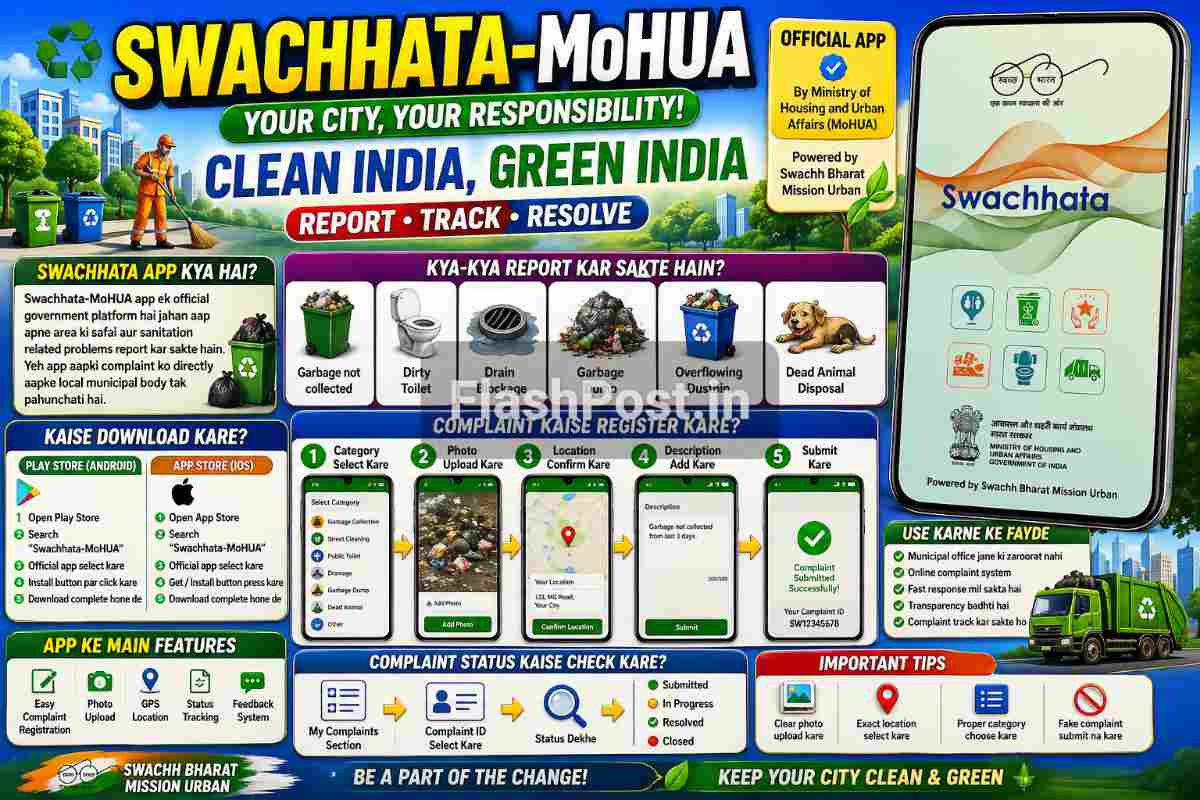
Swachhata-MoHUA ek official government mobile application hai jo Swachh Bharat Mission Urban ke under launch ki gayi hai. Is app ka main purpose hai citizens ko apne area ki safai aur sanitation related problems directly report karne ka easy system dena.
📑 Table of Contents
- Swachhata-MoHUA App Kya Hai?
- Swachhata App Kaise Kaam Karti Hai?
- Swachhata App Se Kya-Kya Report Kar Sakte Hain?
- Play Store Se Swachhata App Kaise Download Kare?
- App Store (iPhone) Se Download Kaise Kare?
- Swachhata App Me Account Kaise Banaye?
- Complaint Kaise Register Kare?
- Complaint Status Kaise Check Kare?
- Swachhata App Ke Main Features
- Swachhata App Use Karne Ke Fayde
- Important Tips For Better Complaint Resolution
- Common Problems While Using App
- Conclusion
Agar aapke area me kachra pada hai, drain block hai, public toilet dirty hai, garbage collection nahi ho raha, ya sanitation se related koi problem hai, to aap is app ke through complaint raise kar sakte ho.
Is article me hum detail me samjhenge ki Swachhata-MoHUA app kya hai, kaise kaam karti hai, kaise download kare, aur step by step kaise use kare.
Swachhata-MoHUA App Kya Hai?
Ye ek public grievance app hai jo local municipal authorities tak safai complaints pahunchane ke liye banayi gayi hai.
- Government official sanitation complaint platform
- Location-based complaint system
- Photo upload support
- Complaint tracking facility
- Citizen feedback system
Swachhata App Kaise Kaam Karti Hai?
App complaint ko directly aapke local urban body / municipal department tak bhejti hai.
Basic workflow kuch is tarah hota hai:
- User issue detect karta hai
- App me photo aur location upload karta hai
- Complaint department ko forward hoti hai
- Authority issue assign karti hai
- Problem solve hone ke baad status update hota hai
- User feedback de sakta hai
Swachhata App Se Kya-Kya Report Kar Sakte Hain?
- Garbage not collected
- Street cleaning issue
- Dirty public toilet
- Drain blockage
- Garbage dump complaint
- Dead animal disposal issue
- Overflowing dustbin
- Sanitation vehicle issue
Play Store Se Swachhata App Kaise Download Kare?
- Apne phone me Google Play Store open kare
- Search box me type kare Swachhata-MoHUA
- Official government app identify kare
- Install button par click kare
- Download complete hone ka wait kare
App Store (iPhone) Se Download Kaise Kare?
- Apple App Store open kare
- Search kare Swachhata-MoHUA
- Official app select kare
- Get / Install button press kare
- Download complete hone de
Swachhata App Me Account Kaise Banaye?
- App open kare
- Language select kare
- Mobile number enter kare
- OTP verify kare
- Basic profile details fill kare
- Account ready ho jayega
Complaint Kaise Register Kare?
Step 1: Complaint Category Select Kare
App open karte hi complaint category choose kare jaise garbage, toilet, drainage etc.
Step 2: Photo Upload Kare
Issue ki clear photo le ya gallery se upload kare.
Step 3: Location Confirm Kare
GPS se current location auto detect hoti hai. Zarurat ho to manually adjust kare.
Step 4: Description Add Kare
Problem ko short me explain kare.
Step 5: Submit Kare
Submit button dabate hi complaint register ho jayegi.
Complaint Status Kaise Check Kare?
- My Complaints section open kare
- Complaint ID select kare
- Status dekhe:
- Submitted
- In Progress
- Resolved
- Closed
Swachhata App Ke Main Features
| Feature | Use |
|---|---|
| Complaint Registration | Safai issue report karna |
| Photo Upload | Problem proof attach karna |
| GPS Location | Exact issue location bhejna |
| Status Tracking | Complaint progress dekhna |
| Feedback Rating | Resolution quality rate karna |
Swachhata App Use Karne Ke Fayde
- Municipal office jane ki zarurat nahi
- Online complaint system
- Fast response mil sakta hai
- Transparency badhti hai
- Complaint track kar sakte ho
Important Tips For Better Complaint Resolution
- Clear photo upload kare
- Exact location select kare
- Proper category choose kare
- Description simple aur clear likhe
- Fake complaint submit na kare
Common Problems While Using App
Location Detect Nahi Ho Rahi
GPS ON kare aur location permission allow kare.
OTP Nahi Aa Raha
Network check kare ya resend OTP try kare.
Complaint Submit Nahi Ho Rahi
Internet connection aur app permissions check kare.
Conclusion
Swachhata-MoHUA app ek useful government platform hai jo citizens ko direct safai complaint register karne ka easy system deta hai. Iske through aap apne area ki sanitation problems easily report kar sakte ho aur unka status bhi track kar sakte ho.
Agar aap apne area ko clean rakhna chahte ho aur local issues quickly report karna chahte ho, to ye app bahut helpful ho sakti hai.
Digital India ke time me aise apps public participation ko aur strong banate hain.
💬 Leave a Comment
Recent Comments
Be the first to comment!